Skip to content
TatvaFit

Fee management for gym owners · Android

Every rupee, on the record.

TatvaFit replaces the fee register on your front desk. Record payments in seconds, see who’s overdue at a glance, and send the reminder on WhatsApp without chasing anyone from memory.

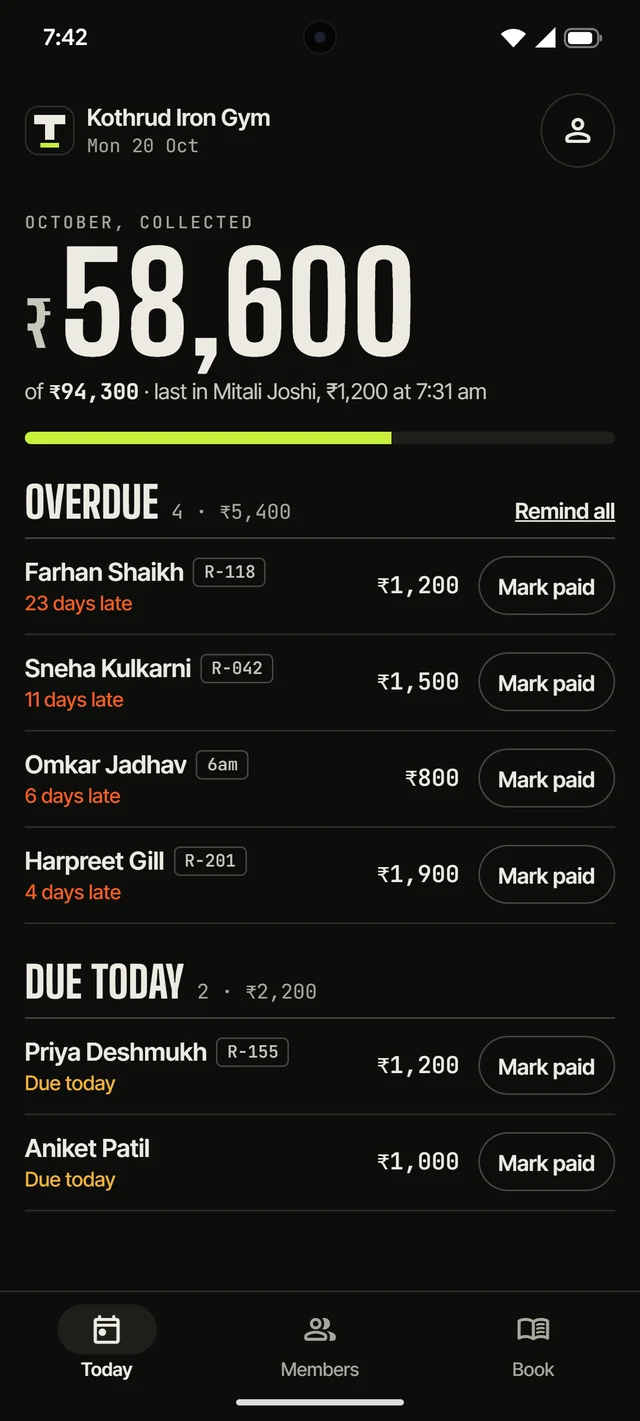
The app’s Today screen · sample members
  • WhatsApp reminders
  • Cash, UPI & card
  • Your own member tags
  • Overdue rules
  • Android
  • Cash
  • UPI
  • Card
  • Due today
  • New joins
  • Paused
  • Expired
  • Overdue
  • Mark paid

01 — The leak

The register leaks.

A paper fee book works until it doesn’t. Every gap in it is money that walked out the door with a member who meant to pay next week.

  1. 01Members “forget” to pay, and nobody notices until month-end.
  2. 02Hours lost reconciling the notebook against the cash box.
  3. 03No single answer to “who owes how much, since when?”
  4. 04Defaulters keep training while their dues quietly age.
  5. 05Cash changes hands with no trail of who took it.
  6. 06Renewal dates live in one person’s memory.
  7. Each of these is a line TatvaFit strikes off.

02 — The ledger

One app. One tap. Zero guesswork.

Built for the person at the front desk, not for an accountant. These are the app’s own screens, shown with sample members.

01Today

Who owes you, the moment you open it

This month’s collection against what’s expected, then everyone overdue (most late first) and everyone due today. Mark paid from the row, or Remind all to send WhatsApp reminders one after another.

  • Overdue first
  • Remind all
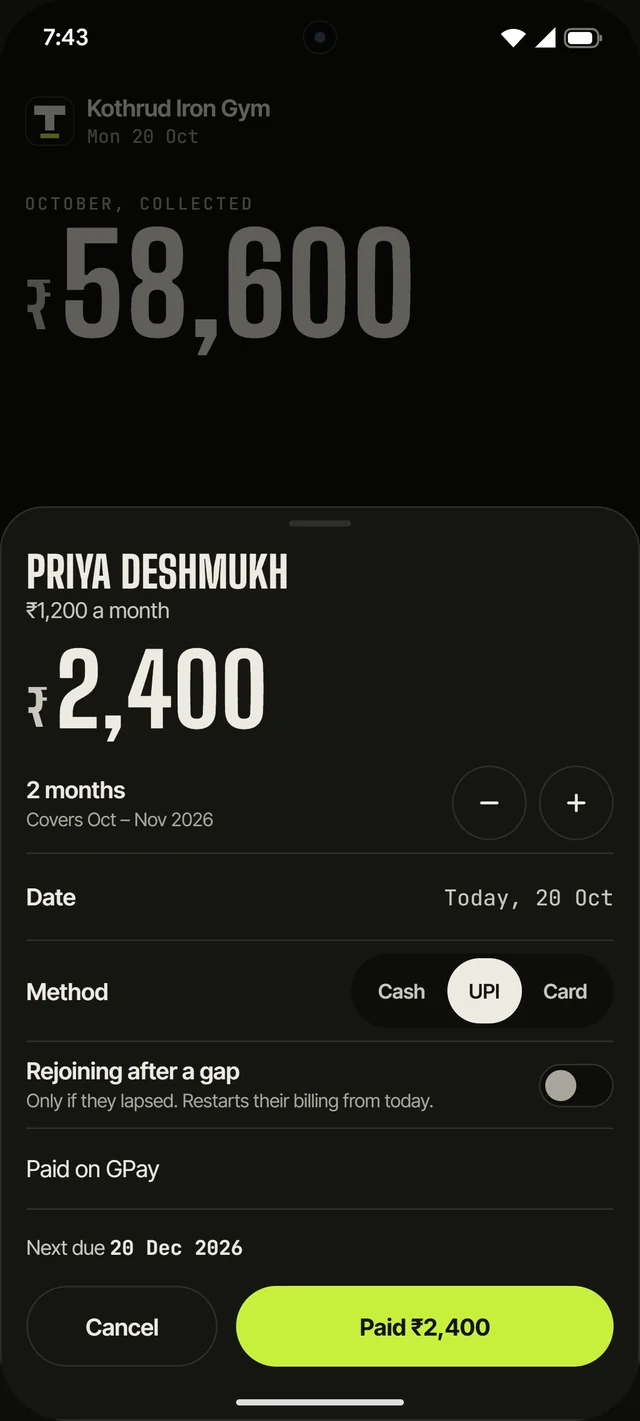
02Mark paid

Mark paid in one tap

One to twelve months at once, cash, UPI or card, a note if you want one, and the next due date before you confirm. Tapped the wrong member? Undo is right there for five seconds.

  • Multi-month
  • Undo
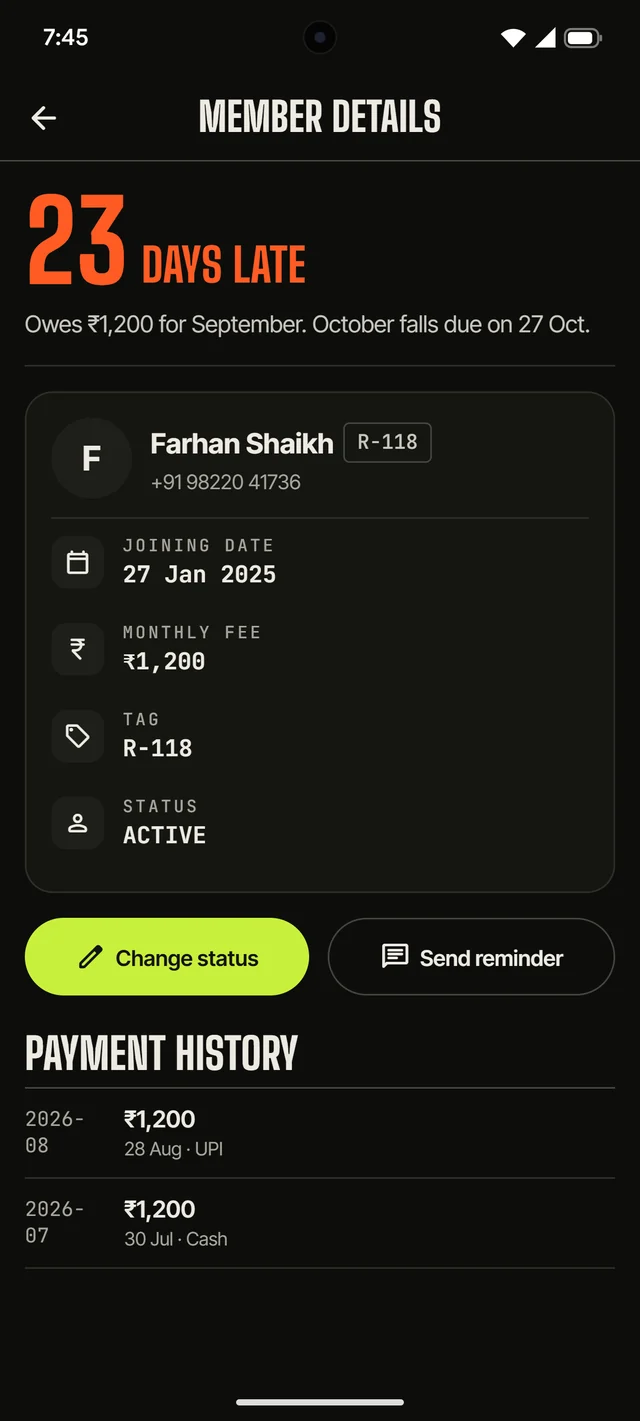
03Member Details

Exactly how late, in plain words

Each member opens on how late they are and what they owe, across several months if it comes to that. Then their fee, status, tag and full payment history. Send Reminder opens WhatsApp with the message written.

  • Days late
  • WhatsApp reminders
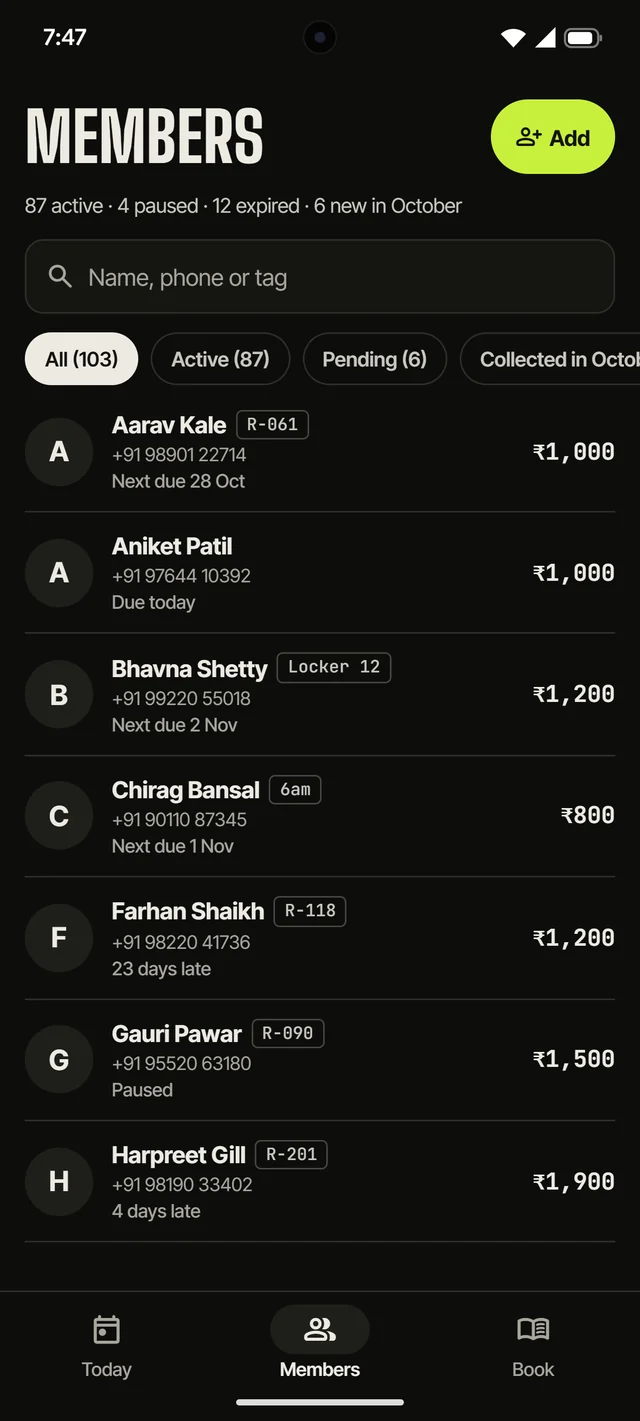
04Members

Your register number, on every member

Give anyone a tag: their number in your paper register, a locker, a batch like 6am. It sits beside their name everywhere in the app, and search finds it.

  • Member tags
  • Search by tag
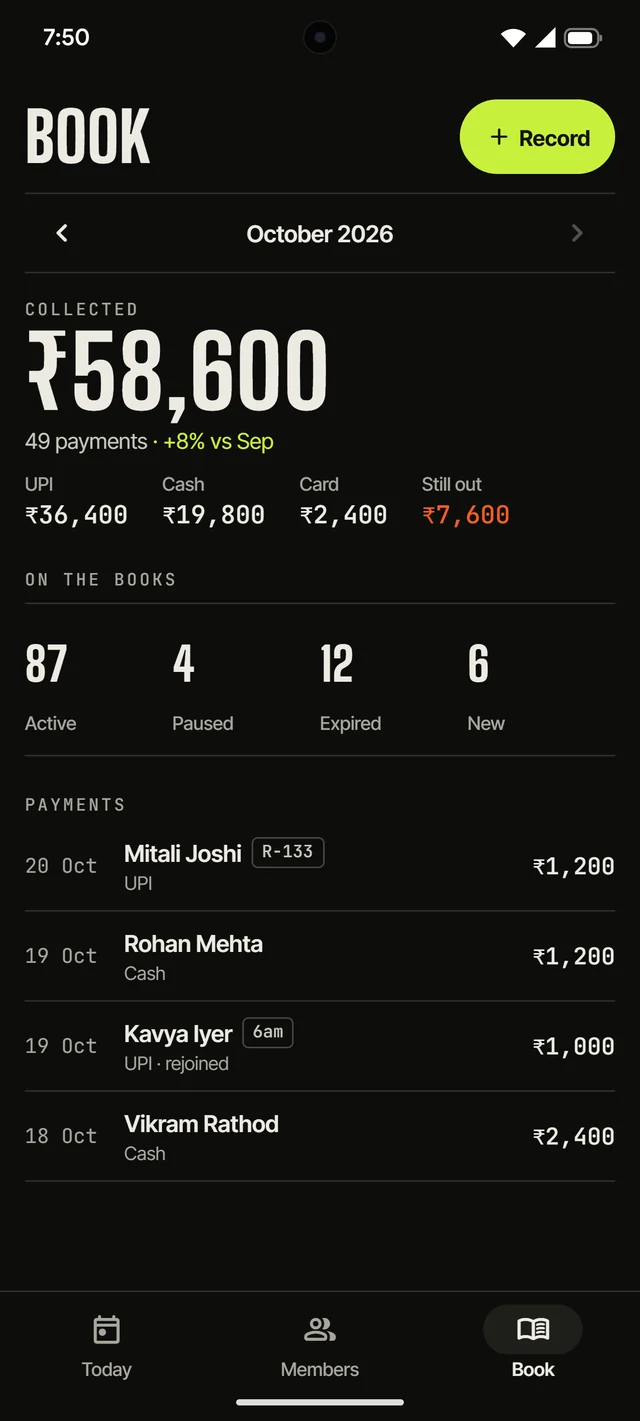
05Book

The month’s book, line by line

What came in, split by cash, UPI and card, against last month. What’s still out, who’s on the books, and every payment line. Step back through earlier months any time.

  • Cash · UPI · Card
  • Month by month
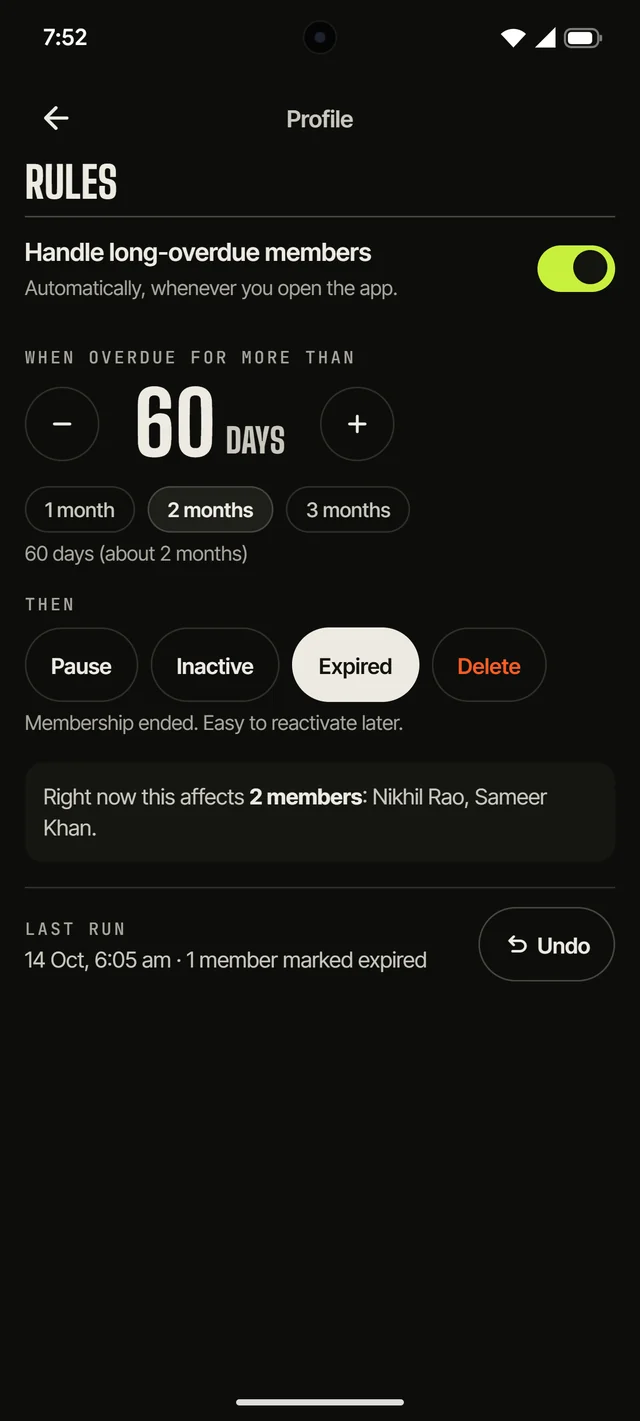
06Profile · Rules

Rules you set once

Decide what happens to members overdue for more than, say, 60 days: pause them, mark them inactive or expired, or remove them. You see who it affects before it acts, and you can undo the last run.

  • Overdue rules
  • Undo

03 — Setup

Live before your next shift.

  1. Step 1 · 30 sec

    Download

    Install TatvaFit from the Google Play Store.

  2. Step 2 · 1 min

    Sign up

    Create your gym’s account with an email address.

  3. Step 3 · Your pace

    Add members

    Name, phone, joining date and monthly fee — start with today’s regulars.

  4. Step 4 · 10 sec

    Record

    Log the first payment. Today is live from here.

  • Reminders on WhatsApp

    One tap opens WhatsApp with the member’s amount and due date already written.

  • Renewals that stay fair

    Due dates follow each member’s joining day, and paused time is never billed.

  • Members check their own dues

    Send a member their access code on WhatsApp. They log in to see their next renewal, payments and your messages, and can’t change a thing.

  • Private to your gym

    Every record is tied to your account. Nobody else can see your members.

04 — Pricing

Every feature · No card for the trial · Cancel any time

TatvaFit is free for your first two months, then ₹99 a month or ₹999 a year

2 months free.

Join before 1 December and the full app is free for your first two months, with no member limits and no card to enter. Gyms that join from December get one month.

Monthly

₹99

a month

Billed every month

Yearly

₹999

a year

Save ₹189, about ₹83 a month

After the trial, pick a plan in the app. Google Play handles the payment, and you can cancel there any time.

Start free
  • Unlimited members
  • Unlimited payments
  • Full payment history
  • WhatsApp reminders
  • Member tags and overdue rules
  • Every feature on this page

05 — Questions

Asked at the front desk.

Something else? tatvafit@mangalcore.com

How much does TatvaFit cost?

Every gym starts with a free trial of the full app, with no card needed: two months if you join before 1 December 2026, one month after that. Then it’s ₹99 a month or ₹999 a year, paid through Google Play, with no limit on members or payments.

What happens if my plan ends?

Nothing is deleted. Your members and payments stay in the app and you can still see them; you just can’t add or change records until you pick a plan again. Members can keep checking what they owe.

Where is my data stored?

Your records are stored in the cloud (on Supabase) and every row is tied to your account, so only you can see them. Our privacy policy has the details.

How are renewal dates worked out?

From each member’s joining day: someone who joined on the 14th renews on the 14th, whenever they actually pay. Paused time is added on, and a member who lapses and returns can restart from their new payment date.

How many members can I add?

As many as your gym has. There is no cap.

How do reminders work?

Tap Send Reminder on a member and WhatsApp opens with a message showing the amount and due date. You check it and press send. Remind all on the Today screen walks you through every overdue member, one chat after another.

What happens to members who stop paying?

You decide, once, in Profile → Rules: after a number of days overdue (60, say), TatvaFit can pause them, mark them inactive or expired, or remove them. It shows who it would affect before you switch it on, and you can undo the last run.

Can I use my register numbers?

Yes. Give any member a tag (a register number, a locker, a batch like 6am) and it shows beside their name everywhere. Search finds members by tag too.

Can my members check what they owe?

Yes. Each member has an access code, and Member Details sends it to them on WhatsApp. They log in with their phone number and that code to see their next renewal, their payment history and your messages. They can’t change anything.

Is there an iPhone version?

TatvaFit is on Android today, through the Google Play Store.

06 — Start

Close the notebook.

Put this month’s fees on the record tonight. Two months free on Android, ready in a few minutes.